· 8 min read
The second income nobody does your paperwork for
Contents
- I have a W-2 job and a 1099 side gig. Here is the receipt sorter I built so April stops being a shoebox.
- Why so many engineers have a 1099 now
- What changes when you get a 1099
- What I tried first
- The design: three rules
- How it works
- Four moments from real use
- The detour: I built a bridge I didn’t need
- What it is not
- Try it

I have a W-2 job and a 1099 side gig. Here is the receipt sorter I built so April stops being a shoebox.
This is not tax advice and not a filing tool. It is a sorter: it suggests, I approve, my tax preparer decides. US forms only.
The W-2 side of my life runs itself. My employer withholds tax, sends me a form in January, and I never think about it.
The 1099 side does not. It is a second income with no withholding and no bookkeeping, and it leaves a downloads folder full of PDF receipts that I promise myself I will sort “this weekend”. Then it is April.
If you are an engineer who has started taking contract work on the side, you probably know the feeling. You earn a few thousand dollars. You know some of your costs are deductible. You do not want a bookkeeping subscription for a business of one. And you do not trust a chatbot to do your taxes.
I don’t either. So I built something smaller: one folder, one sheet I own, and an assistant that sorts receipts by my own rules and asks when it is unsure. It works with Claude, it is free, and the code is on GitHub.
Why so many engineers have a 1099 now
A lot of the engineers I know picked up contract work in the last year or two, much of it training and evaluating AI models: writing coding tasks, grading model answers, building rubrics. It fits around a day job, and it pays for expertise you already have.
That is my own observation, but the numbers behind it are large. In July 2026 The New York Times reported that a single AI training-data company pays about 30,000 contractors more than $4 million a day. Job boards are full of part-time “train AI models” contracts aimed at experienced software engineers.
Almost all of that work is paid on a 1099. Which means a lot of people with a lifetime of W-2s are about to file their first Schedule C.
What changes when you get a 1099
I will keep this short and link to the IRS, because tax rules change and your preparer knows your situation better than a blog post.
- You are a business of one. Side income and its costs go on Schedule C, and expenses are sorted by Schedule C line.
- Nobody withholds for you. If your net earnings are $400 or more you generally owe self-employment tax on top of income tax. You can pay during the year with Form 1040-ES, or ask your W-2 employer to withhold more with a new W-4.
- You may not even get a form. For payments made in 2026, clients only have to send a 1099-NEC once they pay you $2,000 or more, up from $600. The income is taxable either way, so your own records matter more than ever.
- Some home costs may count. A space used regularly and only for the business may qualify for the home office deduction, either the simplified method or actual expenses on Form 8829. A business share of your internet may count too.
- Records matter. The IRS generally suggests keeping supporting records for at least three years.
None of that is hard. What is hard is turning a folder of PDFs into those categories, consistently, without losing an afternoon.
What I tried first
A spreadsheet by hand. It works for three weeks. Then a busy month happens, the receipts pile up, and the sheet is a fiction.
Bookkeeping apps. They are built for real businesses with payroll and invoices. I would pay a monthly fee to categorise maybe forty receipts a year, and my financial records would live on someone else’s servers.
Asking a chatbot each time. Paste a receipt, ask “is this deductible?” It answers confidently. Next week it has forgotten that I told it my internet is 50% business, and it guesses again. A guess that sounds sure is the worst thing to have in a tax record.
The design: three rules
So I wrote down what I actually wanted before writing any code.
- It asks instead of guessing. If a receipt could be business or personal, the row becomes a question for me, not a category.
- It never does arithmetic. The model reads and classifies. Every total, percentage and form figure is a formula in the sheet, where I can see it.
- Only I approve. Nothing counts toward a total until I mark it approved. The assistant can suggest; it cannot decide.
How it works
The whole thing is a Claude skill and a Google Sheet template. It runs on my own Claude account with two of my own connectors: Google Drive to read and file receipts, and Google Sheets to write rows. No server, no API key, no account to create. The project never sees my files.
The sheet has four tabs:
- Expenses: one row per receipt.
- Categories: totals per Schedule C line.
- Filing summary: the figures grouped for Schedule C, Form 8829 (home office) and Form 2441 (dependent care, for W-2 households with kids).
- My situation: my rules in plain words, plus per-vendor rules.
I drop a PDF into a Drive folder. Claude reads the new files, applies the rules in “My situation”, and writes one row per receipt with either a suggested category or a question. “Total paid” and “Deductible amount” are sheet formulas, and the skill reads back what it wrote to check it.
Each row has a status: Needs answer, Suggested, Approved or Rejected. Only I set the last two. When I approve a row, the receipt moves from the inbox to a subfolder for its vendor or category. Nothing is ever deleted or renamed. Each row stores the Drive file’s ID, so the same receipt can never be added twice.
For each receipt the skill works through a fixed order: my vendor rules first, then my general settings, then how the same vendor was treated before, and only then a built-in category guide. Some checks always force a question: a receipt from the wrong tax year, a likely duplicate, a mix of business and personal items, equipment that could be personal, or a missing business-use share.
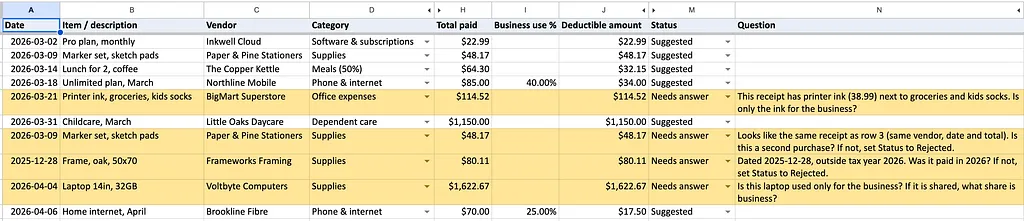
Sample data: an invented household and the ten sample receipts from the repo. Yellow rows are the ones where it asked instead of guessing
Four moments from real use
It asked the right question. Three receipts came in for a software subscription I could have used for the contract work or for something personal. A guessing model would have filed them as business software. The skill left them as questions instead: which was it? Only I know that, and it matters.
It asked about the share, not the category. A lodging receipt came in. The skill knew what it was, but not how much of the trip was business, so it asked. I answered, and the row was written with that share and the right formulas.
It waited instead of asking. A freshly uploaded PDF came back empty because Drive had not finished processing it. The first version asked me what the file was. Now the skill waits and retries, and only asks if the file is still unreadable.
The formula did the math. I set my internet to 50% business use once, in “My situation”. Every later bill got that 50% applied by a formula in the sheet, not by the model.
The detour: I built a bridge I didn’t need
I assumed the hard part would be reading receipts. It wasn’t. The hard part was writing one row.
The Google Drive connector can search, read and move files, Sheets included. It cannot edit cells. So my first version worked around that with the oldest trick there is: swap files through a folder.
- Claude wrote the rows it wanted to add as a small text file in Drive.
- A short Apps Script, pasted into my own sheet, ran every hour, applied those rows, and wrote a text snapshot of the whole sheet back to Drive for Claude to read next time.
It worked. I ran it on demand and on a schedule with real receipts: read, question asked, approved, filed. I was quite pleased with it.
Then I turned on the separate Google Sheets connector, and Claude wrote the row straight into the sheet. No script, no text files, no hourly wait. The bridge I had designed, built and tested was solving a problem that a toggle in my settings already solved.
The lesson is boring and I keep relearning it: before you build around a gap, check which connectors already exist.
The bridge is still in the repo as an optional fallback, for anywhere Claude cannot edit the sheet directly. And to be honest about what’s proven: the weekly scheduled run has been tested end to end through the bridge. Through the Sheets connector alone, I have so far tested on-demand runs, not a scheduled one.
What it is not
- It is not tax advice. It suggests a category; you and your preparer decide what is deductible.
- It is not a filing tool. It produces an organized sheet and a folder of receipts to hand to whoever files your return.
- It is not a bookkeeping system. No bank feeds, no invoices, no payroll.
- It only knows US forms: Schedule C, Form 8829, Form 2441.
Try it
The repo is here: github.com/Rubick1997/tax-receipt-sorter (MIT licence). It includes ten invented sample receipts and an example household, so you can try it without touching a real receipt.
You need a paid Claude plan with skills, connectors and scheduled tasks, and a Google account. On Team and Enterprise plans, an admin has to enable the Google connectors first. Runs count toward your plan’s usage.
Setup in brief:
- Install the skill in Claude.
- Turn on the Google Drive and Google Sheets connectors.
- Create the sheet from the template. You can ask Claude to “set up my tax sheet”, and the README has a manual fallback.
- Fill in “My situation” with your tax year and your rules.
- Drop in the sample receipts and run it once.
- Create a weekly scheduled task with the same prompt. If your scheduled runs can’t write to the sheet, add the bridge script from the README.
Then answer its questions when it has them, approve what looks right, and hand the sheet to your preparer in April.
The W-2 side of your life will still run itself. Now the other side has one folder, one sheet and an assistant that knows when to ask.